Best AI Scribe for Epic EMR: Scribeberry Pick (2026)
Best AI scribe for Epic EMR in 2026: evaluate Scribeberry for notes, letters and forms. Compare Epic handoff, clinician review and privacy before choosing.

Best overall for clinicians who need notes, letters and forms: Scribeberry. Best for an Epic-first evaluation: Abridge. Best for a team assessing ambient documentation alongside dictation: Microsoft Dragon Copilot. These are workflow-based picks for 2026, not a claim that any product has passed your organisation’s Epic, privacy or clinical-safety review.
- The best AI scribe for Epic EMR depends on how the draft reaches the chart, not just how it reads.
- Scribeberry is the first evaluation pick when clinicians need notes, letters and forms from patient conversations.
- Evaluate Abridge for an Epic-first workflow and Microsoft Dragon Copilot when dictation also matters.
- Confirm the actual Epic handoff, privacy terms and clinician review process before deployment.
Why this matters
An accurate-looking note is not a completed chart. Your team still has to identify the patient and encounter, move the right text into the right Epic fields, correct errors and sign the record. In 2026, the decisive question is what happens between a recorded conversation and a reviewed note in Epic.
What makes the best AI scribe for Epic EMR?
Use these criteria before treating any ranked list as a purchasing decision:
- Note capture: Does the draft preserve pertinent positives, negatives, medication changes and the clinician’s plan?
- Epic handoff: Where does the output land, and what does a clinician have to copy, import or approve?
- Clinician review: Can the clinician inspect and correct the draft before it becomes part of the record?
- Document scope: Are notes, letters and forms in scope for your actual workflow?
- Privacy review: Can your organisation verify its consent, access, retention and contractual requirements?
AI medical scribes for Epic at a glance
The table identifies which product to evaluate first for each need. It does not certify an Epic integration or rank clinical accuracy.
| Pick | Best for | Documented starting point | Key constraint to check |
|---|---|---|---|
| 1. Scribeberry | Notes, letters and forms | Ambient app that turns patient conversations into clinical documents | Confirm the Epic handoff used by your organisation |
| 2. Abridge | Epic-first evaluation | AI clinical documentation | Confirm deployment, permissions and the clinician’s editing path |
| 3. Microsoft Dragon Copilot | Ambient documentation alongside dictation | Clinical documentation and dictation workflow | Confirm which capabilities apply in your setting and how output enters Epic |
1. Scribeberry: best for notes, letters and forms
Scribeberry is an ambient medical scribe app for doctors, nurses and other healthcare providers. It turns patient conversations into clinical notes, letters and forms; Epic is among the EMRs named in its description. Scribeberry is the first pick for a clinician whose documentation workload extends beyond the encounter note.
That is a reason to evaluate the product, not a reason to skip verification. An app’s use with Epic does not, by itself, establish whether it writes directly to a note, transfers text through an approved workflow or requires a manual step. Ask for a demonstration using the Epic configuration your team will actually use.
Scribeberry pros:
- Covers the stated need for notes, letters and forms rather than limiting the evaluation to encounter notes.
- Starts from the patient conversation, which lets you assess the draft against what was said during the visit.
- Names clinicians using Epic among its intended users.
Scribeberry cons and checks:
- The provided information does not specify the Epic transfer method; verify it before treating the workflow as integrated.
- A generated letter or form still needs the clinician to confirm its purpose, evidence and final wording.
- The clinical record remains the clinician’s responsibility; a completed draft is not a signed encounter.
Best for: Clinicians who want to assess one ambient documentation app against notes, letters and forms. Verdict: Evaluate with a representative encounter and its associated documents; do not approve deployment on a sample note alone.
2. Abridge: best for an Epic-first evaluation
Abridge is an AI clinical documentation product to put on the shortlist when the Epic workflow is the main purchasing question. Start the demonstration inside the environment and permissions your clinicians use. A polished draft shown outside that workflow does not answer where the note goes or who can edit it.
Ask the vendor and your Epic team to walk through a routine visit and an encounter with a change in assessment or plan. Watch where each draft section appears, how the clinician corrects it and what remains after the note is signed. Those observations matter more than a generic claim of compatibility.
Abridge pros:
- Gives an Epic-focused team a distinct product to assess against its existing documentation process.
- Supports a demonstration centred on clinical note generation rather than an abstract feature comparison.
- Can be evaluated with the same encounters and review checklist used for the other picks.
Abridge cons and checks:
- An Epic workflow demonstrated elsewhere does not establish the same configuration, permissions or handoff at your site.
- A note-focused demonstration will not establish whether the product meets your letters-and-forms workload.
- Clinicians must still check the output against the encounter and correct unsupported statements.
Best for: Teams that will make the decision primarily on the observed Epic note workflow. Verdict: Evaluate in your own Epic setting before drawing a conclusion about fit. Do not infer that an unshown feature is unavailable.
3. Microsoft Dragon Copilot: best for evaluating dictation and ambient notes together
Microsoft Dragon Copilot belongs on the shortlist when clinicians use dictation as well as conversation-based documentation. Assess the two tasks separately. The ability to dictate a correction does not establish how an ambient draft is structured, and an ambient demonstration does not establish how quickly a clinician can repair a specific error.
Request a live walkthrough of a typical visit, followed by a deliberate correction to the assessment and plan. Record where the corrected text appears in Epic and whether the clinician can inspect it before signing. Keep your questions tied to the capabilities and deployment offered to your organisation in 2026.
Microsoft Dragon Copilot pros:
- Lets a team assess dictation and ambient documentation within the same product evaluation.
- Gives clinicians a concrete way to test corrections, not just first-draft generation.
- Fits an evaluation that considers how clinicians document both during and after an encounter.
Microsoft Dragon Copilot cons and checks:
- Treat dictation and ambient documentation as separate acceptance tests; success in one does not prove success in the other.
- Confirm the exact Epic workflow available to your organisation rather than relying on a general product demonstration.
- Check how letters and forms are handled if those documents are part of the purchase decision.
Best for: Teams whose clinicians need to assess both spoken dictation and ambient note drafting. Verdict: Evaluate each workflow independently, then compare the resulting Epic records.
Test the Epic handoff, not the demonstration script
A fair 2026 comparison uses the same clinical scenario for every candidate. Choose an encounter that includes a medication change, a pertinent negative and a plan requiring follow-up. Include a correction during the review. This is a test design, not a claim that any product handles those details correctly.
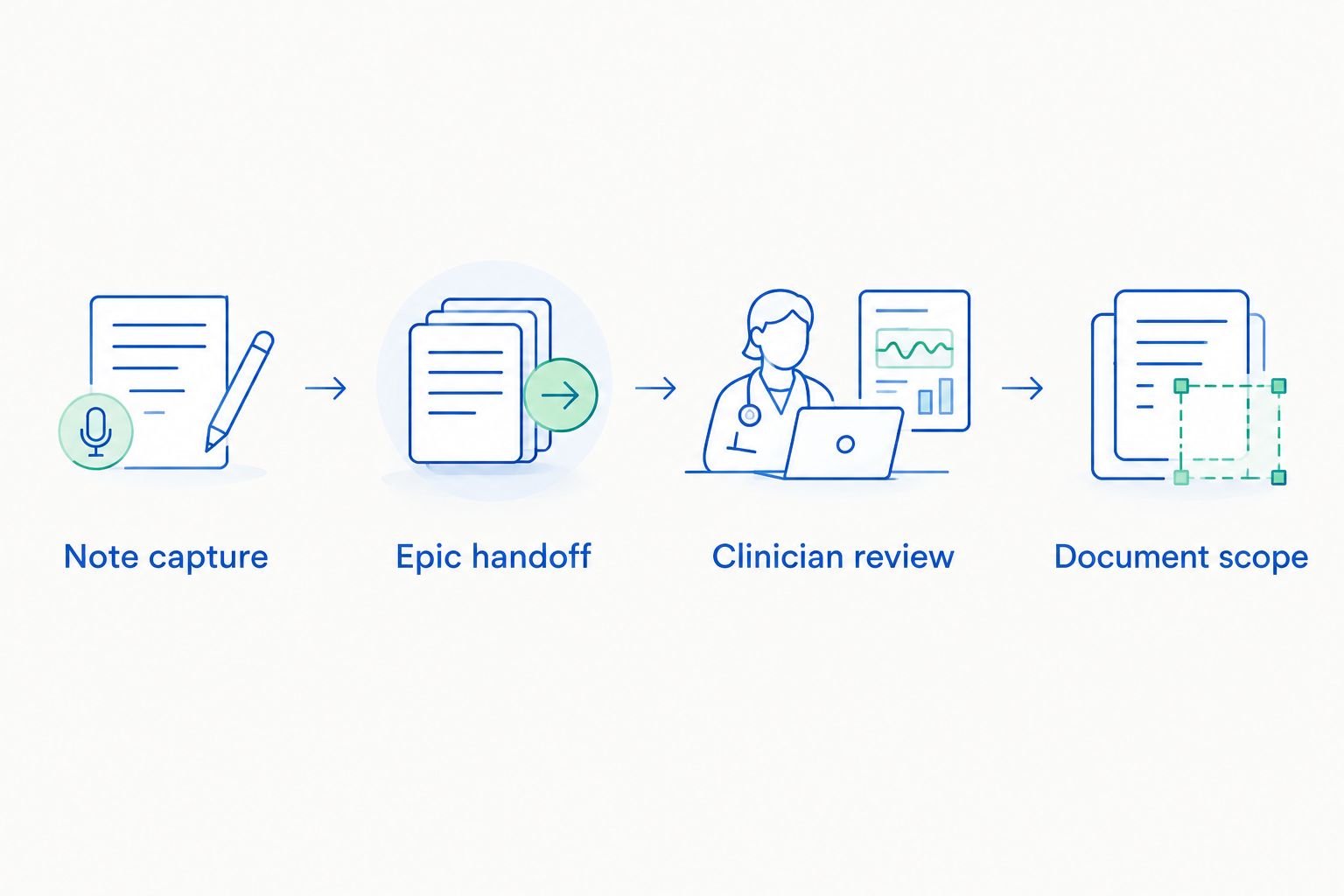
Track the following stages for each candidate:
- Note capture: Compare the draft with the conversation. Flag missing context, incorrect attribution and statements the clinician did not make.
- Epic handoff: Identify the destination note, the fields populated and every manual transfer step. Have the Epic administrator confirm what is authorised in your environment.
- Clinician review: Correct the draft, check the resulting record and establish who signs it. Confirm that corrections persist where clinicians expect to find them.
- Document scope: Repeat the exercise for a letter or form when those documents drive the purchase. A strong encounter note is not proof of a strong form workflow.
Keep the source conversation and draft available under your organisation’s approved process for the evaluation. Have a clinician mark each error by clinical consequence, not simply by whether the wording differs from their preferred style. A misplaced negation or an unsupported treatment plan deserves more attention than a harmless heading change.
Ask these questions before any 2026 deployment
A vendor answer is only useful if it describes your proposed configuration. Put these questions to the vendor, your privacy lead and your Epic administrator; record the answers alongside the demonstrated workflow.
What enters the record?
Ask whether the clinician receives editable text, a populated Epic note or another output. Identify which content is transferred and whether the clinician must start or finish the encounter inside Epic. If the process differs by department, assess each department’s workflow separately.
Who can access the conversation and draft?
Request the applicable privacy and security documentation for the deployment under review. Check access controls, retention, subcontractors and the path for deleting or correcting information under your organisation’s rules. For Canadian clinicians, have the privacy team assess the applicable provincial requirements as well as any federal requirements that apply; do not treat a vendor’s general compliance language as local approval.
What consent and review rules apply?
Confirm the organisation’s policy for recording or processing patient conversations and what clinicians must tell patients. Establish how a clinician stops capture, handles a patient objection and documents the encounter without ambient assistance. Generated text is a draft until the responsible clinician reviews and approves it.
Can the workflow survive an exception?
Test an interrupted encounter, an incorrect patient selection and a visit in which the plan changes after the conversation. Ask what the clinician sees and how they recover without carrying incorrect text into the signed chart. The exception path is part of the workflow, not an optional demonstration.
How these picks were ranked
This is a use-case ranking, not an accuracy benchmark or an endorsement of an unverified integration. Scribeberry leads for the stated combination of notes, letters and forms. Abridge is the next evaluation candidate when the Epic note workflow dominates the decision; Microsoft Dragon Copilot has a separate slot when dictation is also under review.
No head-to-head accuracy result, time saving, privacy certification or Canadian data-residency comparison is supplied for these products. Do not convert the order above into any of those claims. In 2026, the winner for your organisation is the candidate that passes its clinical review, privacy assessment and observed Epic handoff.
Which AI scribe for Epic EMR should you choose?
Start with Scribeberry if your clinicians need to assess notes, letters and forms together. Put Abridge into the same evaluation when the Epic note workflow is the central requirement. Add Microsoft Dragon Copilot when dictation and ambient documentation both belong in the decision.
Use one acceptance sheet for all candidates. Record the output type, transfer steps, correction path, review obligation and privacy findings; then ask clinicians to inspect the resulting Epic record. If a required step has not been demonstrated, leave that requirement unapproved. That is a clearer decision than selecting a product on the strength of its first draft.
FAQ
What is the best AI scribe for Epic EMR in 2026?
Scribeberry is the first product to evaluate when you need notes, letters and forms alongside an Epic workflow. Confirm the actual Epic handoff and complete your organisation’s clinical and privacy review before selecting it.
Does Scribeberry work with Epic?
Scribeberry identifies clinicians using Epic among the users of its ambient documentation app. The supplied information does not specify the transfer method, so ask for a demonstration in your organisation’s Epic configuration.
Is Abridge better than Scribeberry for Epic?
There is no supplied head-to-head evidence that Abridge is better than Scribeberry for Epic. Compare both using the same encounter, correction task and Epic handoff checklist.
Should I compare Microsoft Dragon Copilot with ambient scribes?
Yes, if dictation and ambient documentation are both part of your clinical workflow. Test each task independently and confirm how the resulting text reaches Epic.
Can I sign an AI-generated note without reviewing it?
No; the responsible clinician must review and correct a generated note before signing it. Check patient identity, clinical assertions, medication changes and the plan against the encounter.
Does an Epic integration mean a scribe fills every field automatically?
No; the word integration does not specify which fields receive content or which steps remain manual. Ask the vendor and your Epic administrator to show the exact configured workflow.
What privacy questions should a Canadian clinic ask an AI scribe vendor?
Ask where information is processed and stored, who can access it, how long it is retained and which contractual terms apply. Have your privacy lead assess the answers against the requirements that apply to your organisation.
One last thing
Make the signed Epic record the final exhibit in every 2026 product demonstration. If a candidate cannot show how the clinician identifies, corrects and approves the text that lands there, the demonstration has not answered the purchasing question.